x-technology

The Agent Runtime Workshop: Node.js, Tools, CI/CD
The workshop focuses on theory and practice building production-ready AI agents with Node.js and modern Agent SDKs. We will use a real codebase as an execution environment to explain the core concepts behind agents: the agent loop, tool calling, structured outputs, context management, guardrails, tools, and human approval. We will build a Node.js SDK-based engineering agent that receives a development task, inspects a repository, proposes and applies safe code changes, runs validation checks, and exports execution artifacts to a messenger/storage. We will also cover how this agent fits into a broader production architecture: where MCP, orchestration, multi-agent patterns, CI/CD, security boundaries, observability, and workflow tools such as n8n may be useful.
By the end of the workshop, participants will understand not only how to use an Agent SDK, but also what remains their responsibility when designing safe and maintainable agent runtimes.
Prerequisites
- Good understanding of JavaScript or TypeScript
- Experience with Node.js and API development
- Basic knowledge of LLMs is helpful
Goals
- Understand AI agent and SDK architecture: loop, planning, memory, tools, guardrails
- Build a production-oriented engineering agent with an Agent SDK
- Apply sandboxing, permissions, approval gates, and observability
- Deploy agents locally and to cloud runtimes
Code
Agenda
- Introduction 📢
- Setup 🛠️
- AI Agents World 🌎
- Agents SDK 🧰
- Demo #1 - Build agents 🤖
- Runtime 🔒
- Deployment 🚀
- Demo #2 - Deployment Aspects 🚢
- Summary 📚
- Feedback 💬
- References 🔗
Introduction
Alex Korzhikov

Software Engineer, Netherlands
My primary interest is self development and craftsmanship. I enjoy exploring technologies, coding open source and enterprise projects, teaching, speaking and writing about programming - JavaScript, Node.js, TypeScript, Go, Java, Docker, Kubernetes, JSON Schema, DevOps, Web Components, Algorithms 🎧 ⚽️ 💻 👋 ☕️ 🌊 🎾
Setup
- Node.js 22+
- OpenAI-compatible API key for live LLM demos is optional
- Gemini / Google API key for ADK demos is optional
Project setup:
git clone https://github.com/x-technology/workshop-agents.git
cd workshop-agents/src/agent-sdk
npm install
Optional environment examples:
# Step 01 raw HTTP demo
export ANTR_KEY==...
npm run start -- ...
AI Agents World
| Aspect | Gen AI | AI Agents | Agentic AI |
|---|---|---|---|
| Goal | Generate content / answers | Complete specific tasks | Achieve complex goals autonomously |
| Autonomy | Low | Medium | High |
| Planning | None | Limited | Advanced |
| Tool Use | No | Yes | Yes (dynamic, multi-tool) |
| Memory | Minimal (per session) | Short / long-term | Persistent, contextual |
| Human Input | High (prompt-driven) | Medium (task oversight) | Low (goal-driven) |
| Typical Use | Q&A, summarization, writing | Booking, data fetching, workflows | Research, orchestration, decision-making |
| Example Behavior | Responds to prompts | Executes steps with tools | Plans, adapts, and executes end-to-end tasks |
IDE as a Code Agent
You’re already using one!
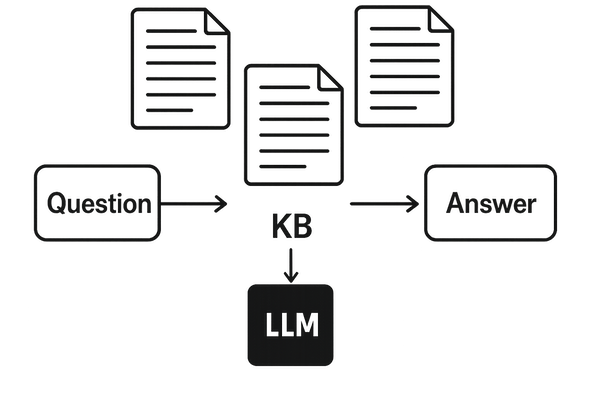
RAG Recap
LLM Agents vs Workflows
- Workflows are systems where LLMs and tools are orchestrated through predefined code paths
AI agents
Systems where LLMs dynamically direct their own processes and tool usage, maintaining control over how they accomplish tasks
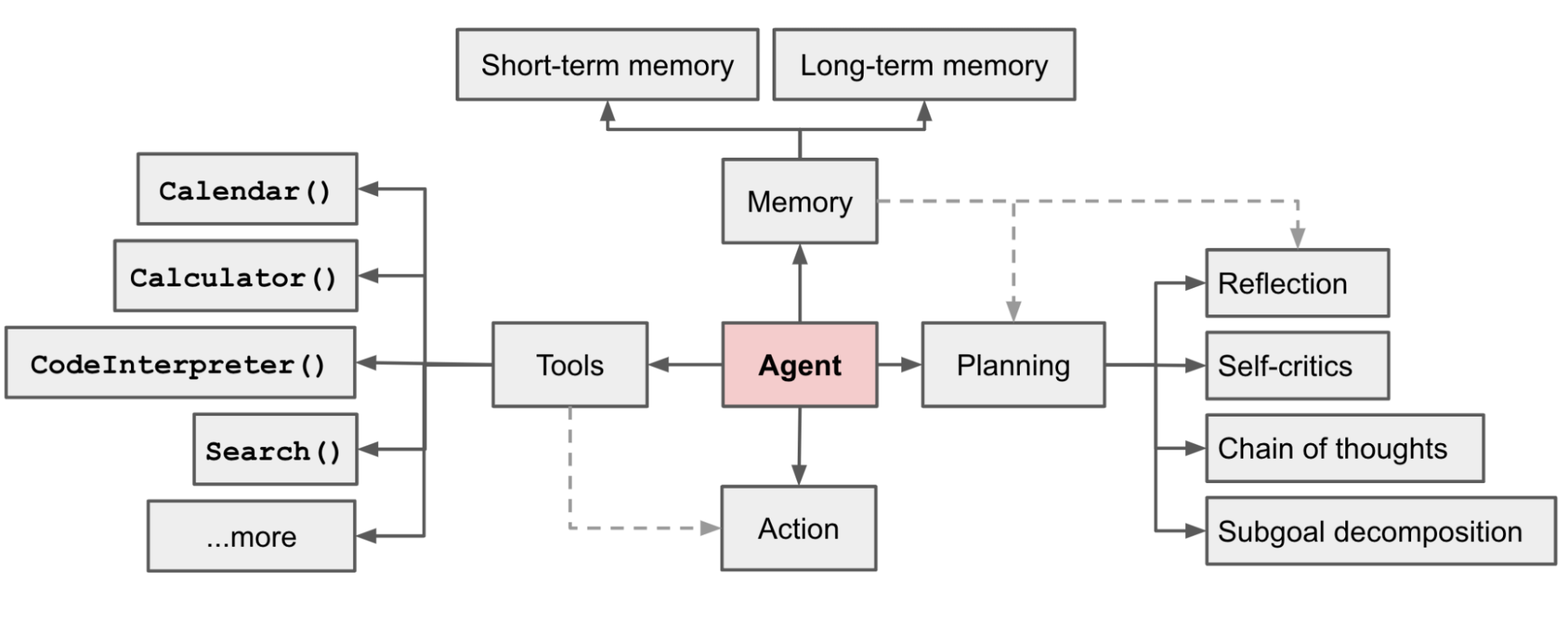
A system that autonomously performing tasks on behalf of a user or another system by designing its workflow and utilizing available tools
LLM - Large Language Models trained on tons of sources and materials, having billions of parameters
Loop - Agent’s fundamental core operating system

Planning - task decomposition, multi-plan selection, external module-aided planning, reflection and refinement, memory-augmented planning, evaluation

p = (a0, a1, · · · , at) = plan(E, g; Θ, P).
g0, g1, · · · , gn = decompose(E, g; Θ, P);
pi = (ai0, ai1, · · · aim) = sub-plan(E, gi; Θ, P).
Prompt Architectures - Chain of Thought (CoT), ReAct, PRACT, RAISE, Reflexion, …
// ReAct
while (true) {
  const response = await llm(messages, tools);

  if (response.tool_call) {
    const result = await runTool(response.tool_call);
    messages.push(result);
  } else {
    return response.output;
  }
}
// Reflexion
export async function reflexionLoop(task: string) {
  let bestAnswer = null;
  let bestScore = -Infinity;

  for (let i = 0; i < 3; i++) {
    console.log(`Attempt ${i + 1}`);

    const trajectory = await runAgent(task);
    const evaluation = await evaluateTrajectory(task, trajectory);
    const reflection = await reflect(task, trajectory, evaluation);

    storeReflection(reflection);

    console.log("Score:", evaluation.score);
    console.log("Lessons:", reflection.lessons);

    if (evaluation.score > bestScore) {
      bestScore = evaluation.score;
      bestAnswer = trajectory.finalAnswer;
    }
  }

  return bestAnswer;
}
Memory - the processes used to gain, store, retain, and later retrieve information. Context engineering, Short-term (trigger, prompt, session) vs long-term (db, rag) memory.
Tools - extend LLM with ability to act outside its context - read data (files, APIs, web), compute (code execution), act (send email, write DB, click UI)
Agents SDK
| Claude Agent SDK | OpenAI Agents SDK | Google ADK | AI SDK Vercel | LangChain | |
|---|---|---|---|---|---|
| Primary purpose | Runtime for Claude-based agents with tool use + MCP | Build multi-step agents on OpenAI APIs | Build agents on Gemini / Vertex AI | Fullstack AI toolkit (not agent-first) | Composable chains, agent flows |
| Languages | TypeScript, Python ⚠️ (Python partial) | TypeScript, Python | Python, TypeScript, Go, and Java | TypeScript / JavaScript | Python, TypeScript |
| Model support | Claude only | OpenAI (⚠️ LiteLLM workaround) | Model-agnostic | Model-agnostic | Model-agnostic |
| Orchestration & Multi-agent | Subagents, tool loops, hooks; basic multi-agent orchestration | Agents + handoffs; native multi-agent support | Pipelines (seq/parallel); A2A protocol (early stage) | Tool-based loops, limited multi-agent | Chains, agent executors |
| Loop control | ⚠️ Hooks into steps, loop is internal | ❌ Hidden — tools + instructions only | ⚠️ Orchestration-based, not loop-level | ❌ Loop is internal | Partial via chains |
| Tools | MCP, bash, browser, file system | Function calling, tools, MCP | Google tools + functions ⚠️ (MCP maturity?) | Tool calling, MCP | Tool calling, MCP |
| Memory | CLAUDE.md + runtime context ⚠️ (not true long-term memory) | Threads + state | Vertex memory ⚠️ (needs validation depth) | Per-request (stateless by default) | Buffers + vector DB |
| Best fit | Tool-heavy automation agents | Fast production agents | Google ecosystem | AI web apps | Flexible agent flows, prototyping |
ADK (Google)
Build production agents, not prototypes. ADK is the open-source agent development framework that lets you build, debug, and deploy reliable AI agents at enterprise scale. Available in Python, TypeScript, Go, Java, and Kotlin.
ADK developer Skills
npm install @google/adk
npm install -D @google/adk-devtools
npx adk web
import { FunctionTool, LlmAgent } from "@google/adk";
import { z } from "zod";

/* Mock tool implementation */
const getCurrentTime = new FunctionTool({
  name: "get_current_time",
  description: "Returns the current time in a specified city.",
  parameters: z.object({
    city: z
      .string()
      .describe("The name of the city for which to retrieve the current time."),
  }),
  execute: ({ city }) => {
    return {
      status: "success",
      report: `The current time in ${city} is 10:30 AM`,
    };
  },
});

export const rootAgent = new LlmAgent({
  name: "hello_time_agent",
  model: "gemini-flash-latest",
  description: "Tells the current time in a specified city.",
  instruction: `You are a helpful assistant that tells the current time in a city.
                Use the 'getCurrentTime' tool for this purpose.`,
  tools: [getCurrentTime],
});
Key features:
- Agent loop
- Model-agnostic
- Deployment-agnostic
- Built-in tools - file operations, web Search, execution. Compare claude VS openai
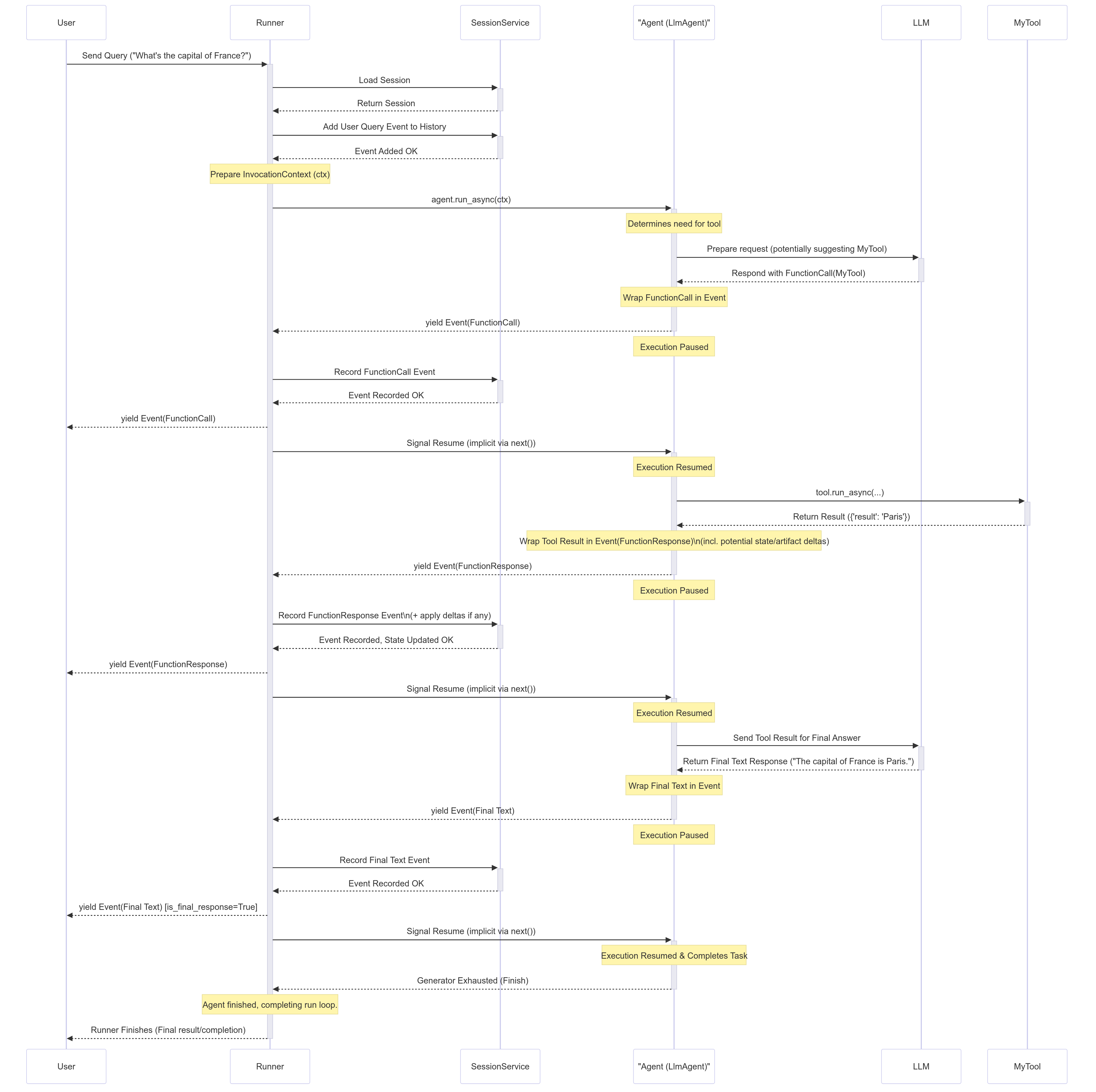
Demo #1 - Build agents
# ANTR_KEY=
# source .env
docker build -t agent-sdk .
docker run -it -e ANTHROPIC_API_KEY=$ANTR_KEY -v $(pwd):/app agent-sdk /bin/bash
# inside the container - ls, pwd
npm run start -- "say hi"
npm run start -- "add a simple test and test environment, dir and runner command - i want to use node.js native test framework"
npm test
- Claude Agent SDK
- Google ADK
Runtime
- Isolation
- Least privilege
- Tools have permission settings to allow, block, or prompt the user for approval
- Limit file, network, credentials access with proxy
options: {
  allowedTools: ["Read", "Glob", "Grep"],
  permissionMode: "acceptEdits",
  continue: true
},
- Defense in depth
- Security Schemes - Authentication options
- Contract-first tools
- Code and Web responses auto-checks
- Guardrails - Control your model and tool calls with built-in, custom or external hooks
- Human-in-the-Loop
- Decrease temperature and context
- Define budget
docker run \
  --cap-drop ALL \
  --security-opt no-new-privileges \
  --security-opt seccomp=/path/to/seccomp-profile.json \
  --read-only \
  --tmpfs /tmp:rw,noexec,nosuid,size=100m \
  --tmpfs /home/agent:rw,noexec,nosuid,size=500m \
  --network none \
  --memory 2g \
  --cpus 2 \
  --pids-limit 100 \
  --user 1000:1000 \
  -v /path/to/code:/workspace:ro \
  -v /var/run/proxy.sock:/var/run/proxy.sock:ro \
  agent-image
- Observability - Tracing and Logging
Deployment
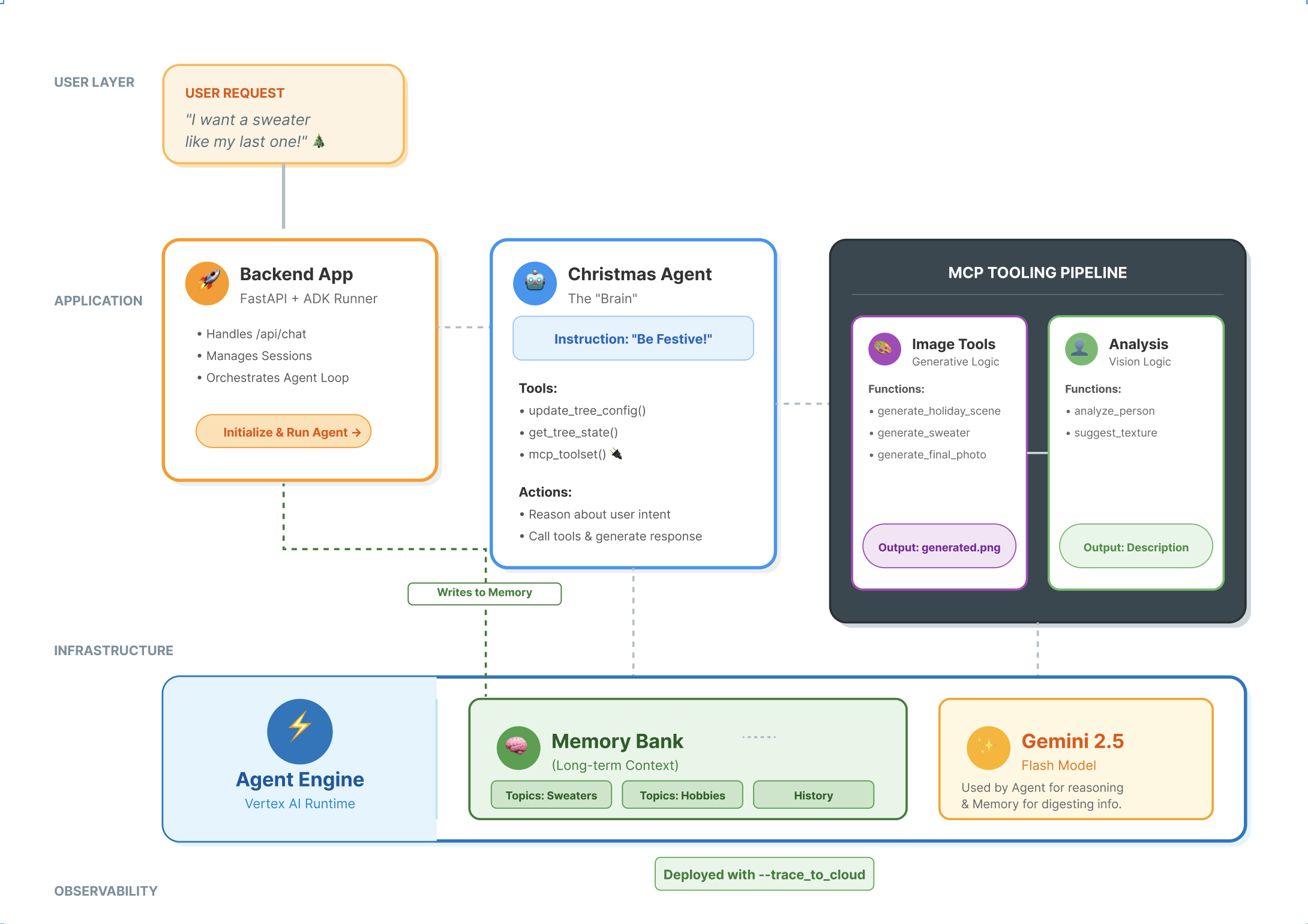
| Option | Description |
|---|---|
| Local | Self-hosted runtime, full control over environment, container, and secrets |
| Monolith | Configurable native client |
| Cloud — Claude Managed Agents | Provider-managed sessions, sandbox, event stream; deploy via platform.claude.com/.../deployments |
| Cloud — Google ADK on Cloud Run | Agent as a cloud-native service; Cloud Run provides container runtime, HTTPS, IAM, autoscaling, logs |
Local
Run the agent runtime in a local container or directly in your Node.js environment. Useful for development, testing, and offline execution.
Monolith Agent Deployment
claude -p "say hi"
Claude Managed Agents
Claude SDK as a coding-native agent runtime. Claude Managed Agents as the native deployment path.
Deploy versioned agent configurations via platform.claude.com/.../deployments. Managed sessions, built-in sandbox, event stream, and cloud or self-hosted environments are included.
Google ADK on Cloud Run
ADK native deploy:
adk deploy cloud_run \
  --project=my-gcp-project \
  --region=us-central1 \
  --service-name=engineering-agent \
  --app-name=my_adk_app
Container path (full control):
docker build -t gcr.io/my-project/engineering-agent .
gcloud run deploy engineering-agent \
  --image gcr.io/my-project/engineering-agent \
  --region us-central1 \
  --set-env-vars GOOGLE_API_KEY=...
| Claude Managed Agents | ADK on Cloud Run | |
|---|---|---|
| Runtime managed by | Anthropic | You (GCP) |
| Deploy unit | Agent config | Container image |
| Scaling | Managed | Cloud Run auto |
| Best for | Claude-native, fast to ship | GCP ecosystem, full control |
Demo #2 - Deployment Aspects
- Github Co-pilot
- Set up Claude GitHub Actions for a repository
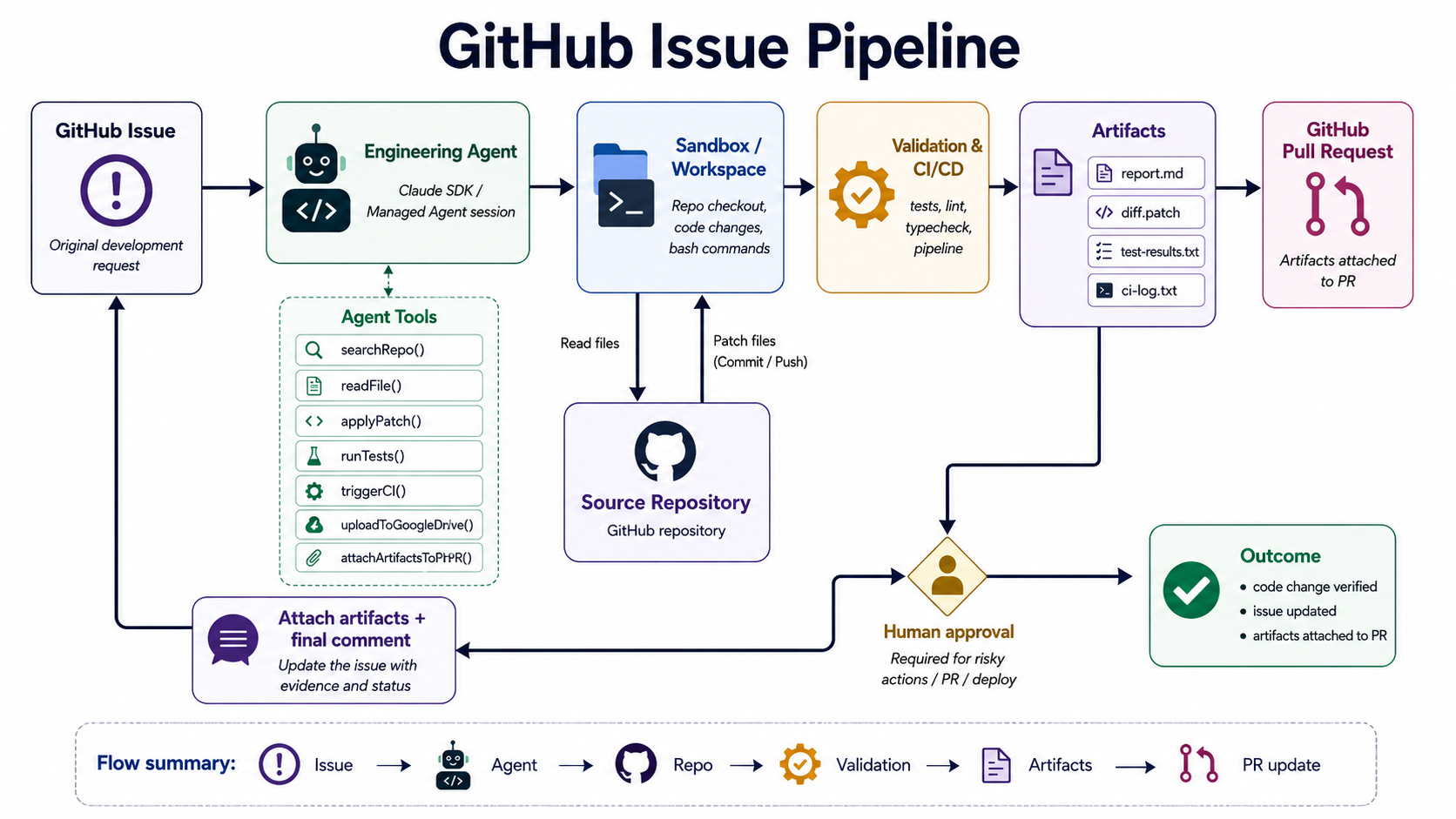
claude,/install-github-app - Github Issue Pipeline
cd managed-agent-ts
npm install
cp .env.example .env   # fill in ANTHROPIC_API_KEY, GITHUB_TOKEN, GITHUB_REPO_URL
npm run setup-vault
npm run setup
# Copy the printed `AGENT_ID` and `ENVIRONMENT_ID` into `.env`
npm run task -- "Add text to README file in the main, commit it to a new branch, push it. Use the github MCP server to create a pull request in OWNER/REPO into main brach"
npm run task -- "which branch u r at?"
Summary
An agent runtime is a control plane — coordination, policy, memory, and tooling around an LLM. Node.js fits well as that plane, and Agent SDKs give you the building blocks: tool calling, structured outputs, sessions, guardrails, and tracing. Production readiness comes from sandboxing, approval gates, observability, and connecting the agent to real CI/CD and deployment targets.
Feedback
Please share your feedback on the workshop. Thank you and have a great coding!
If you like the workshop, you can become our patron, yay! 🙏
References
- Building effective agents - Engineering at Anthropic Dec 19, 2024
- LLM Zoomcamp - A Free Course on Real-Life Applications of LLMs
- A Survey of AI Agent Protocols
- Lilian Weng - LLM Powered Autonomous Agents
- Awesome AI Agent Protocols
- Understanding the planning of LLM agents: A survey, 5 Feb 2024
- A2A: The Agent2Agent Protocol - DeepLearning.ai
- A2A and MCP: Detailed Comparison
- Agent Skills Overview
- Building Personalized Agents with ADK, MCP, and Memory Bank
Technologies
- LLM
- AI Agents
- MCP
- Agent SDKs
- ADK
- Claude